

Choosing the Right "Engine" for Each Task
Back
 In your daily development work, have you ever encountered these dilemmas?
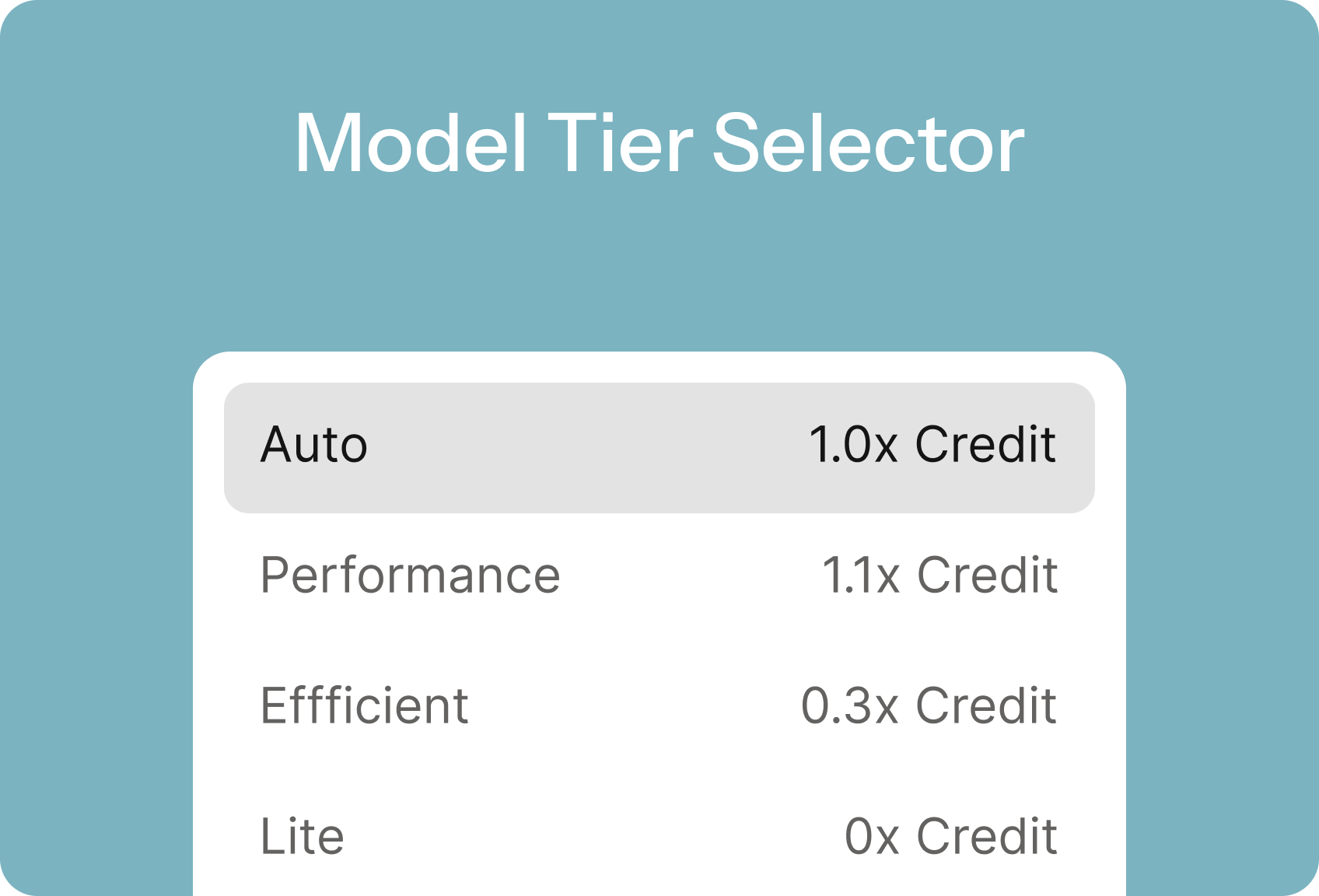
Qoder introduces the Model Tier Selector. We don't just "pile up models"; instead, we provide scenario-based, "just right" choices. Think of it like a smart car: it doesn't just offer a "race mode" that goes full throttle, nor does it make you manually adjust every parameter. Instead, it provides driving modes like Eco, Comfort, Sport, and Auto, allowing you to confidently navigate different road conditions.
Qoder draws from a high-performance model pool and distills it into four intuitive tiers—so you get the right capability, at the right cost, on demand.
For more detailed tier descriptions and feature usage, please refer to our official documentation.
After understanding the concept behind Qoder's Model Tier Selector, the next step is to master how to use it flexibly in your daily work. Just as an experienced driver switches modes based on road conditions and destination, a wise developer will choose the most appropriate AI tier for different coding challenges.
Qoder's recommended usage strategy for the Model Tier Selector is "Smart by Default, Manual as Needed":
The table below intuitively demonstrates the Credit cost overhead for each tier when performing AI coding tasks of similar complexity, using specific task examples.
As we said at the beginning, the Qoder Model Tier Selector is like the driving modes in a smart car—just easily switch between "Eco," "Comfort," and "Sport" modes. Now that you've mastered the use of the four tiers, remember this core strategy:
- You default to one high-performance model for everything. Even basic tasks burn through Credits.
- To save costs, you switch to a basic model, only to get unusable "pseudo-code" when handling complex refactoring, ultimately requiring manual rewrites
- With too many model options and little guidance, every call feels like a guess: “Which one should I use this time?” — and you end up either overspending or stuck in low-quality loops.
Solution: The Model Tier Selector – Choosing the Right "Engine" for Each Task
Qoder introduces the Model Tier Selector. We don't just "pile up models"; instead, we provide scenario-based, "just right" choices. Think of it like a smart car: it doesn't just offer a "race mode" that goes full throttle, nor does it make you manually adjust every parameter. Instead, it provides driving modes like Eco, Comfort, Sport, and Auto, allowing you to confidently navigate different road conditions.
Qoder draws from a high-performance model pool and distills it into four intuitive tiers—so you get the right capability, at the right cost, on demand.
| Tier | Features | Cost |
|---|---|---|
| Auto (Smart Routing) | - The system dynamically dispatches the optimal model for you, achieving a perfect balance of cost and performance with zero decision burden. - Ideal for everyday development. Recommended as the default option. | ≈ x1.0 Credits (Average 10% savings per task compared to Performance mode) |
| Performance | - Best output, pursuing extreme output quality. - Best for tackling complex system refactoring, algorithm design, and other high-difficulty tasks. | ≈ x1.1 Credits |
| Efficient | - Achieving the most with the least, the king of cost-performance - Best for running test cases, bulk code transformations, and other routine or repetitive tasks. | ≈ x0.3 Credits |
| Lite | - Completely free, but currently does not support multimodal queries, and may experience slight delays during peak hours. - Best for quick syntax lookups, basic function implementations, and simple Q&A. | 0 Credits |
Best Practices: Choosing the "Just Right" for Your Coding Challenges
After understanding the concept behind Qoder's Model Tier Selector, the next step is to master how to use it flexibly in your daily work. Just as an experienced driver switches modes based on road conditions and destination, a wise developer will choose the most appropriate AI tier for different coding challenges.
Qoder's recommended usage strategy for the Model Tier Selector is "Smart by Default, Manual as Needed":
- For most daily development scenarios: Stick with the Auto (Smart Routing) tier. Let AI automatically assess task complexity and dispatch the optimal model, ensuring both quality and cost control with zero decision burden.
- Manual switching for special scenarios: When you clearly know the characteristics of a task, you can manually switch tiers to optimize cost or quality.
1. Performance
- Core Value: For a slightly higher cost (≈1.1× Credits), you get the highest quality output, avoiding rework and systemic risks.
-
Scenarios & Practical Examples:
- System Architecture Design : Design an order service supporting millions of daily active users, considering database sharding, idempotency, state machines, and reconciliation mechanisms. This tier can output a clear, fault-tolerant, and scalable architectural solution.
- Complex Algorithm Implementation : Implement a sliding window deduplication logic for a real-time recommendation system, requiring low latency and high throughput. This tier can generate code that balances performance and correctness, along with suggestions for boundary testing.
- In-depth Bug Diagnosis : An intermittent memory leak occurs in production, with sparse logs. This tier can infer possible leak points and provide remediation strategies by combining stack traces, code paths, and concurrency models.
- Large-scale Refactoring : Decomposing a user module from a monolithic application into a separate microservice, ensuring interface compatibility and secure data migration.
- When to manually select it: When the task impacts core business, has a long logical chain, has low fault tolerance, or you've tried other tiers but the output wasn't reliable enough.
2. Efficient
- Core Value: At approximately 0.3× Credits, reliably complete a large number of "standard tasks", freeing up human resources for more creative work.
-
Scenarios & Practical Examples:
- Batch Unit Test Generation: Automatically generate Jest test cases covering edge conditions for 20 newly developed utility functions, including mocks and error paths.
- Standardized API Development: Quickly generate a full set of Spring Boot Controller + Service + DTO boilerplate code based on Swagger definitions.
- Frontend Component Building: Based on design specifications, generate a React component (including TypeScript types, PropTypes, and basic styling).
- Technical Document Draft: Automatically generate API descriptions, error code lists, and invocation examples for a newly completed payment callback module, for subsequent human refinement.
- When to manually select it: When tasks are clearly structured, highly repetitive, don't require high creativity, but demand consistent output quality.
3. Lite
- Core Value: 0 Credits consumed, best for rapid 0-to-1 validation, quick Q&A, and basic feature implementation.
-
Scenarios & Practical Examples:
- Syntax Quick Check : "How to read a file with pathlib in Python?" or "How to write an HTTP request with a timeout in Go?"
- Small Utility Function : "Write a JS function that converts ISO8601 time to local timezone," or "Generate a regular expression to validate a phone number."
- Quick Start with New Libraries : "How do I define nested models with Pydantic?" or "What's the basic useQuery usage for React Query?"
- Comment Generation: "Generate JSDoc comments for this code snippet"
- When to manually select it: When the question is simple, doesn't require contextual inference, doesn't involve images or multi-turn interaction, and you want to "spend zero credits."
Data Speaks: Differences in Credit Consumption
The table below intuitively demonstrates the Credit cost overhead for each tier when performing AI coding tasks of similar complexity, using specific task examples.
- Credit Consumption Multiplier: Represents the rate at which Credits are consumed by each tier to complete the same task.
- Single Example Task Consumption: Simulates the average Credit amount required to complete a moderately complex AI coding task in different tiers.
| Tier | Credit Consumption Multiplier | Single Example Task Consumption |
|---|---|---|
| Auto | ~1.0× | 10 Credits |
| Performance | ~1.1× | 11 Credits |
| Efficient | ~0.3× | 3 Credits |
| Lite | Free | 0 Credits |
Note: Due to variations in tasks and codebases, actual consumption multipliers may differ.
Take away
As we said at the beginning, the Qoder Model Tier Selector is like the driving modes in a smart car—just easily switch between "Eco," "Comfort," and "Sport" modes. Now that you've mastered the use of the four tiers, remember this core strategy:
- Default to Auto: Let AI automatically "shift gears" based on the task's "road conditions," making it effortless and efficient.
- Switch manually as needed: Use the Performance tier for complex tasks, the Efficient tier for batch processing, and the Lite tier for quick queries.